

Scars of Dracula Online photo mosaic. Interactive search cells by movie names.
Photo Jumble - An easy way to assemble multiple photos on one page.


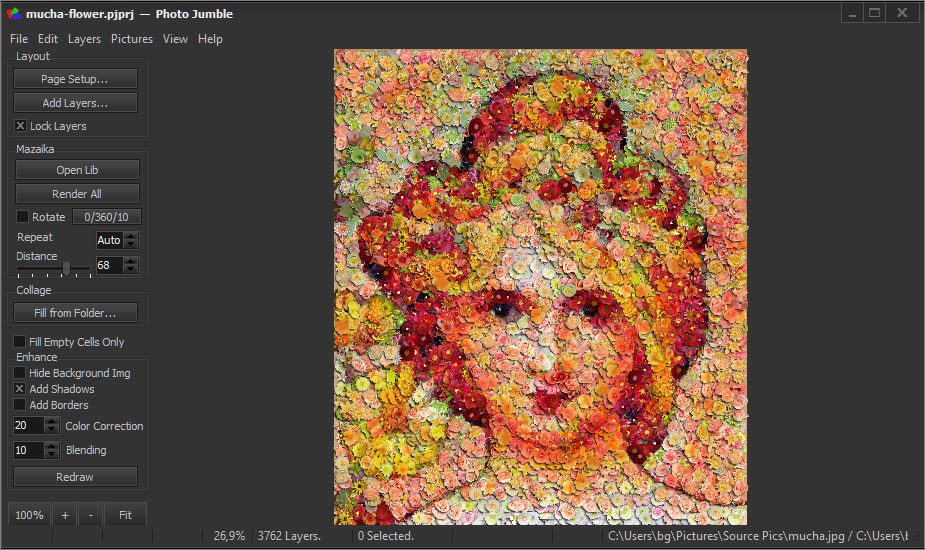


Photo Jumble — How it's works
Photo Jumble uses a different approach to making collages. In Photo Jumble you can create collages with non-regular and even non-rectangular, randomly placed and rotated layers with different aspect ratios.
Photo Jumble allows you to create magnificent collages that look like an unordered pile of photos viewed close up. It can also be used to easily create scrapbook type collages, index photo pages and so on...
There is a very frequent question that people ask us: What the difference between Photo Jumble and Mazaika?
One possible answer is included in our FAQ section.
What's more, can be said? Both programs may be used for photo mosaic. Photo Jumble has more flexible settings for absolute control over the design of your collage.
Both programs can be used to produce regular rectangular cells mosaic. It is easier to make this type of mosaic with Mazaika because Mazaika was designed for that. It takes a little more time with Photo Jumble because you'll have to configure the program for "regular rectangular cells mosaic".
On the other hand, if you want irregular mosaic with non-rectangular cells you can make it only with Photo Jumble. And it will take the same time and efforts as it was in case of regular photo mosaic.
If you need to make a number of photo mosaics and have a tight deadline - Mazaika is your ideal choice. If you like to experiment with different mosaic designs and don't have strict time limits - use Photo Jumble.
Still not sure what's better? Get Mazaika Imaging Suite. You'll have both Mazaika and Photo Jumble for making mosaic and get also very handy Click 2 Crop photo editor that helps you to prepare images for tiles.
Photo Jumble for Mac video tutorial
How to assemble a collection of beer bottle caps that will resemble Girl With Hair Ribbon by Roy Lichtenstein.
Photo Jumble features:
- Realistic shadow and borders around picture layers.
- New Fractal Layers tool helps you to create Multi-sized Layers mosaic.
- Layer rotation for better matching.
- Overlapped layers can be sorted for better visual effect.
- Non-rectangular layers with transparency channel.
- Maximum layer count: 32,000 (Full version)
Several Photo Jumble examples

We use original seashell photos with a removed background to assemble the head of Poseidon, Greek God of the Sea. This library is available for purchase.

Girl face assembled from autumn leaves. Purchase original autumn leaves collection for your own compositions.

Dancing Cambodian Girl Mosaic. This is an example of Multi-sized Layers mosaic. New Fractal Layers tool allows you to assign smaller layers to the picture regions that required more details to display while less important image regions are still covered with larger tile images.

Unlike most of the images on this site, this is not a photo mosaic with a subject. This is just a huge messed pile made from different photos.


Software details
Platforms:
- Windows version: Compatible and working on Windows Vista and later.
- Mac version: Compatible and working on Mac OS X 10.9 and later.
Features:
- Maximum Layers Number: 32,000 (Full version)
- If you need mosaic with more tile number please use our Image Mosaic program Mazaika or Mazaika Imaging Suite.
- Picture database size: Unlimited
- Mosaic resolution: Unlimited
- Maximum output size: Unlimited
- Please save files larger than 30,000x30,000 pixels as .PSB (Adobe Large Document) file format.
- Support for Windows Drag and Drop to open files.
- You may Drag and Drop images into tile layers
- All major file formats are supported.
- Save as *.JPG, *.TIF, *.BMP or *.PSB formats.
- Direct to disk writing for large output files.
- Right-click pop-up to show candidates for the current cell.
- Right-click pop-up menu to view original tile image.
- Context help system.
- Optional Tile Color Correction.
- Optional blend tiles with the original image.
- Support for TTF and PNG files with transparency channel for non-rectangular layers.
Help and support
Photo Jumble includes context help system. It can be activated when the program is running. Alternatively, you may see it online.
 - View online Photo Jumble Help for Windows
 - View online Photo Jumble Help for Mac
As usual, if you have any questions, suggestions, commentaries please don't hesitate to contact us! We love feedback! boris_a_g@hotmail.com.
Download Photo Jumble
For Windows:

-
Requires 64-bit Windows Vista or later (7/8/10/11)
-
Photo-Jumble-Trial-Setup-64bit.exe
For Mac:

-
photojumble-trial.dmg
Register Photo Jumble